Video intelligence for existing CCTV

Give a Super Brain to Your Existing CCTV Cameras.

CamBrain AI analyses compatible CCTV feeds, detects selected events and alerts the right people. Start with a focused use case, validate it on your cameras, and expand when it works.

01 · Today

Today, a camera only records.

Thousands of feeds, and nobody watching most of them. What mattered is found the next morning, on a replay.

02 · Inside

So we go inside it — and give it a super brain.

CamBrain AI runs on a server at your premises, beside your recorder. It reads every configured feed, follows the people and vehicles it sees, and measures crowds as they build.

03 · Understanding

Now it understands what it sees.

Crowds building, intrusions, blocked exits, an animal on the road — flagged within minutes, not found on tomorrow's replay.

04 · Verified

And it checks the fix.

  1. 21:43 Crowd building in the market zone · 3× its usual count
  2. 21:44 The officer for that area is alerted on their phone
  3. 21:52 Officer reports the crowd has been moved on
  4. 21:58 The camera looks again
  5. 21:58 Verified closed ✓

A fix is a claim until the camera confirms it.
See it work

Every use case, in motion.

  1. Camera sees it
  2. AI detects
  3. Alert goes to
  4. They act
use cases

Simulated illustrations — drawn scenes, not real footage. Labels show each use case's real readiness.

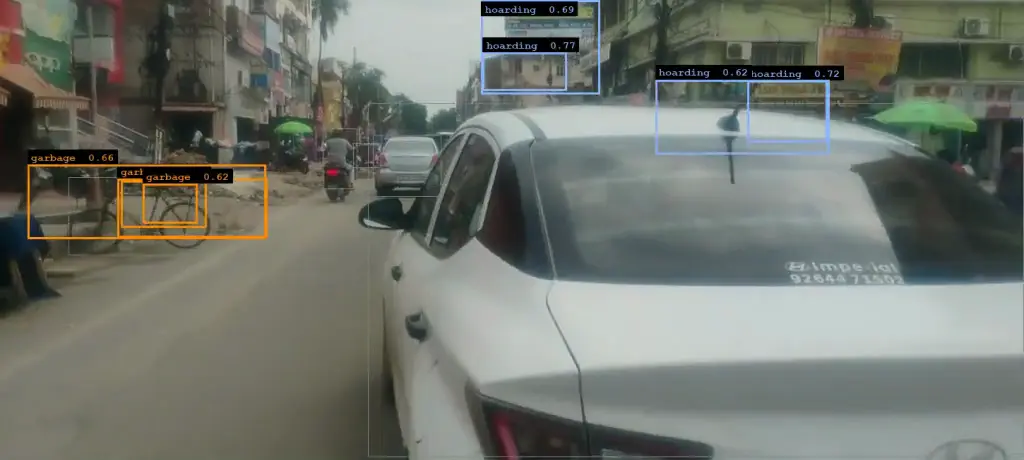
Real footage, real detections

What the brain sees, on an ordinary street camera.

The story above is drawn. This is not: real footage with the detections CamBrain AI actually made on it, and the shape of the alert a person receives.

  • Works with compatible cameras, NVRs and VMS over RTSP or ONVIF
  • Video is analysed on a server at your premises
  • Proven across the 500+ camera network of Pitru Paksha Mahasangam 2026
Street camera view with CamBrain AI detection boxes around roadside garbage, hoardings and encroachment
REC · CAM 02STREET SURVEY
Garbage accumulation detected
Camera
CAM 02 · Market road
Time
10:42:18
Evidence
Snapshot + 10 s clip
Sent to
Ward sanitation officer
Real footage and real CamBrain AI detections from a street-survey camera. The alert card shows the format of an alert; its location, time and recipient are illustrative.
How it works

Three steps from the cameras you have to an alert someone acts on.

Connect existing CCTV

CamBrain AI reads streams from compatible cameras, NVRs and VMS — read-only, over RTSP or ONVIF. Nothing is replaced or rewired.

Subject to stream access and technical compatibility, which we check first.

Detect selected events

A server at your premises analyses the configured streams for the specific use cases your deployment supports — a zone and a schedule, a count against a limit, a camera that has been covered.

Detections are grouped and de-duplicated so one event is one alert.

Alert the right person

A configured event goes to the authorised person for that area and time — on their phone and the control-room screen — with the camera, time, a snapshot and a clip.

They decide what to do. Every acknowledgement is recorded.

Use cases by industry

Choose your industry.

Each page lists the situations it handles, who is told, what happens next — and whether each one is validated, needs set-up on your site, or is still in development.

See all 69 capabilities and their status →

Deployment case study

Pitru Paksha Mahasangam 2026, Gaya.

Across the Mela's 500+ camera network, CamBrain AI put every camera on officers' phones, with live video, playback, search and crowd alerts, for sixteen days and nights.

500+cameras in the Mela's CCTV network
15.36 Mpeople-sightings indexed for search
2.4–2.8 sto answer a text search over 1.52 M sightings, in Hindi or English
≈ 1–2 minfrom a camera's crowd reading to an officer's phone, measured from live timestamps; each camera is read every 90–106 s
1.89 lakhcrowd readings in 24 hours — about two every second across the estate, each camera re-read every 90–106 s
262people counted in one camera at the peak hour

Measured From our evidence pack of 5 October 2026, on the live deployment. Outcomes reported by the deployment team are in the case study, labelled separately. Features used for a government deployment, such as search for a person, are not offered to every customer and run only with authorisation.

See the Deployment Case Study
Readiness, stated

Every capability carries one of three labels.

The labels come from the product's own capability register, so this site cannot say more than the software does.

Validated5

Measured end to end on stated footage and hardware.

Site setup required57

The software exists. It needs zones, schedules, calibration, an integration or testing on your cameras before it is switched on.

In development7

Not available for production use.

Technical requirements

Will it work on your cameras?

It depends on the cameras and on what you want to detect. We check before anything is promised. Compatibility depends on:

  • Camera image qualityFocus, compression and a clean lens decide what can be seen.
  • Stream resolution and frame rate720p at a steady frame rate is a common minimum; some uses need more.
  • Camera position and viewing angleThe camera must actually see the area — from high enough, at a usable angle.
  • LightingNight alerts need working IR or lighting on the area.
  • Network bandwidthEach analysed stream travels from the camera or NVR to the on-site server.
  • NVR / VMS accessRead-only RTSP or ONVIF access to the streams, directly or through your recorder.
  • GPU and server capacityThe server is sized to the number of cameras and use cases.
  • The selected use caseCounting, zones, speed and search each need different things from a camera.
Security and privacy

Analysed where it is recorded.

Video is processed on a server at your premises, not in a cloud AI service.

Read how security, access and retention work →

  • Cameras are read over RTSP/ONVIF, read-only. CamBrain AI cannot move cameras or change your recordings.
  • Only signed-in users with a role you grant can see footage, and every view of recorded footage is logged against a named user.
  • When staff view a camera remotely, video travels over an encrypted connection and is not stored on the way.
  • Exported clips carry a SHA-256 fingerprint so later changes can be detected.
  • An alert is a prompt for a person to look — never proof of wrongdoing.

Find Out What Your Existing Cameras Can Do.

Tell us about your CCTV infrastructure and the problems you want to solve. We will assess technical compatibility and recommend a focused demonstration.

Book a live demo

Tell us about your cameras. We reply by your preferred contact method.

Please enter your name.
Please enter your organisation.
Please enter a valid email address.
Please enter a phone number we can reach.
Please choose an industry.
Preferred contact method
Or call +91 82526 76755 · sales@cambrain.ai

We use these details only to reply to this request. No newsletter.

How it works

Simulated illustration — not real footage

A drawn scene showing what the detection checks and what the alert looks like. Real performance depends on your cameras and is measured during a pilot.